



Infinite XT - FAQ (Surge XT)
Frequently Asked Questions and Answers
How do I install the AOS-Wavetables into the Surge XT VST synthesizer?
To ensure proper functionality of all sound presets in the Infinite XT – Volume 1 collection, you need to install the AOS-Wavetables on your computer. This installation is required only once and the process is very simple.
Note: This installation does not affect any of your existing or previously saved user presets.
The AOS-Wavetables are provided free of charge as part of the Infinite XT – Volume 1 soundware collection and are stored in a separate folder of the same name.
After the installation is complete, the AOS Wavetables will be available directly in the oscillator selection menu of Surge XT under WT → User Wavetables.
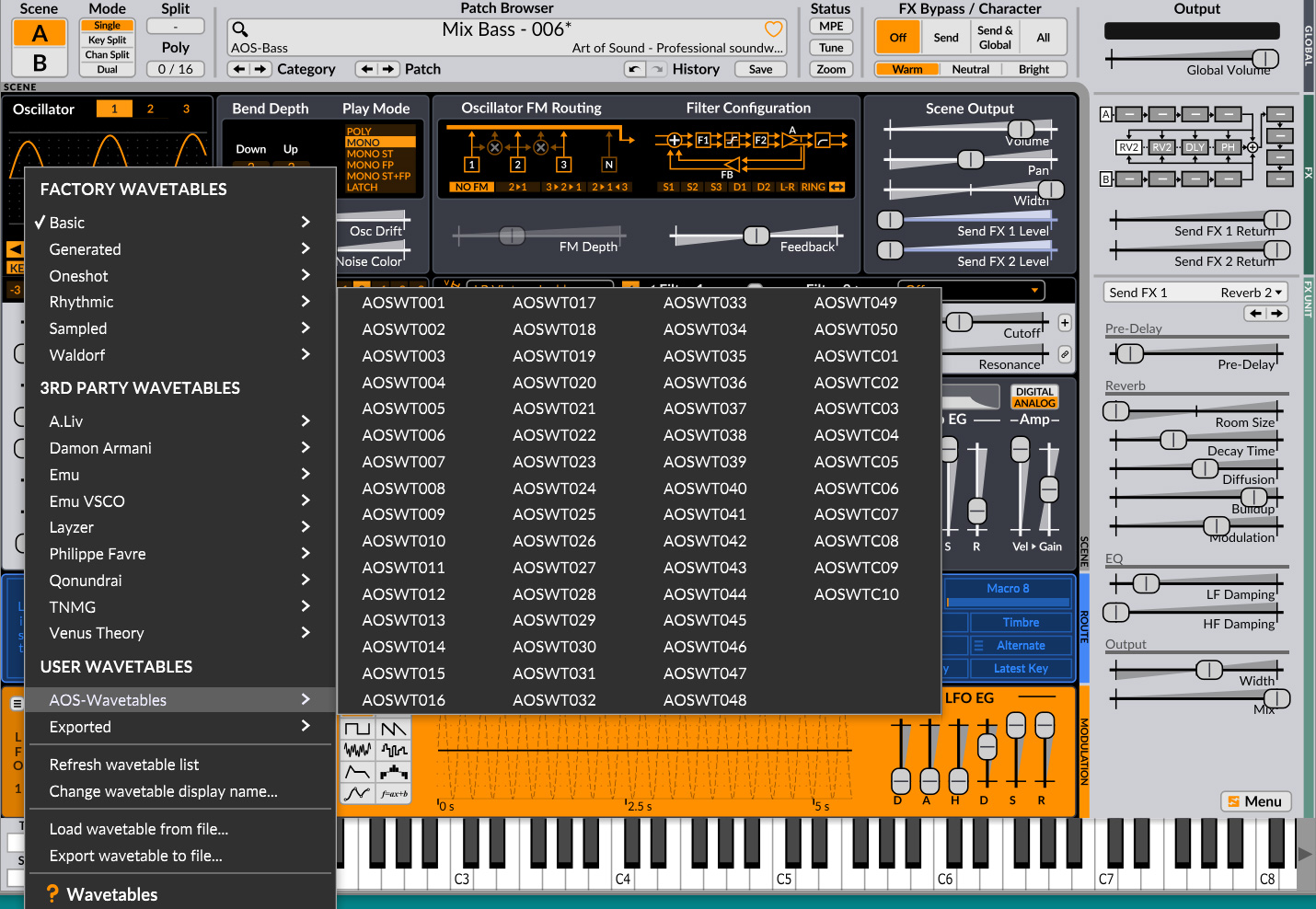
Figure 1: Wavetable selection menu in Surge XT
Notice: To ensure a smooth installation of the AOS Wavetables, do not launch Surge XT or your DAW during the process. Without the AOS Wavetables installed, some presets in the Infinite XT – Volume 1 collection will not function correctly or may not work at all.
All installed AOS-Wavetables can also be used individually to create your own custom presets.
1.1 Location of the Surge XT User Data Folder
Surge XT stores its user presets, wavetables, and other user specific data in a dedicated folder within your operating system. The exact location depends on the platform.
Windows: C:\Users\Your User Name\Documents\Surge XT\
macOS: /Users/Your User Name/Documents/Surge XT/
Linux: ~/Documents/Surge XT/
(This folder is created automatically when you save your first preset or change any user settings.)
What each part of the directory path means:
• C: – the system drive
• Users – the directory where Windows/macOS/Linux stores all user profiles
• Your User Name – your specific system username (e.g., John, Isabella, StudioPC)
• Documents – your personal Documents folder
• Surge XT – the folder created by the application for storing presets and other user data
• Wavetables – the folder created by the application for storing user wavetables
1.2 Surge XT User Wavetables Folder
Inside the Surge XT user folder, open the subfolder named:
Wavetables
The folder paths are:
Windows: C:\Users\Your User Name\Documents\Surge XT\Wavetables
macOS: /Users/Your User Name/Documents/Surge XT/Wavetables
Linux: ~/Documents/Surge XT/Wavetables
(This folder is created automatically when you save your first preset or change any user settings.)
1.3 Copying the AOS Wavetables Files
Open the Wavetables folder:
Windows: C:\Users\Your User Name\Documents\Surge XT\Wavetables
macOS: /Users/Your User Name/Documents/Surge XT/Wavetables
Linux: ~/Documents/Surge XT/Wavetables
(This folder is created automatically when you save your first preset or change any user settings.)
Copy the folder named "AOS-Wavetables", which is included in the Infinite XT – Volume 1 soundware package, into the folder mentioned above.
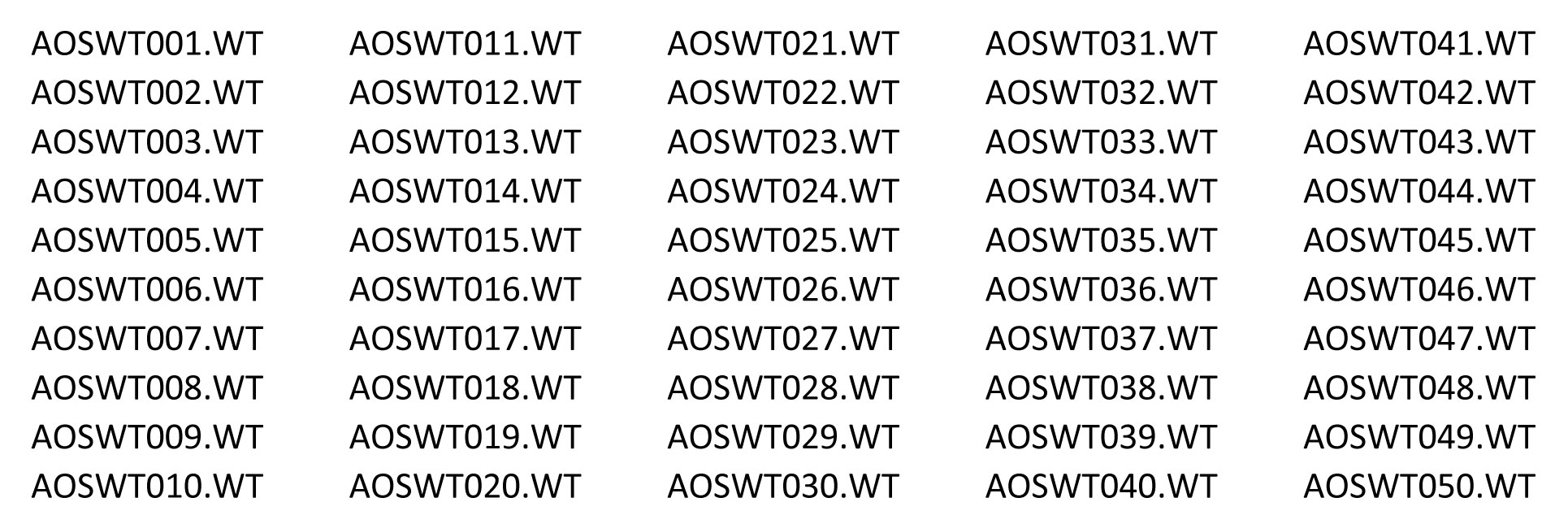
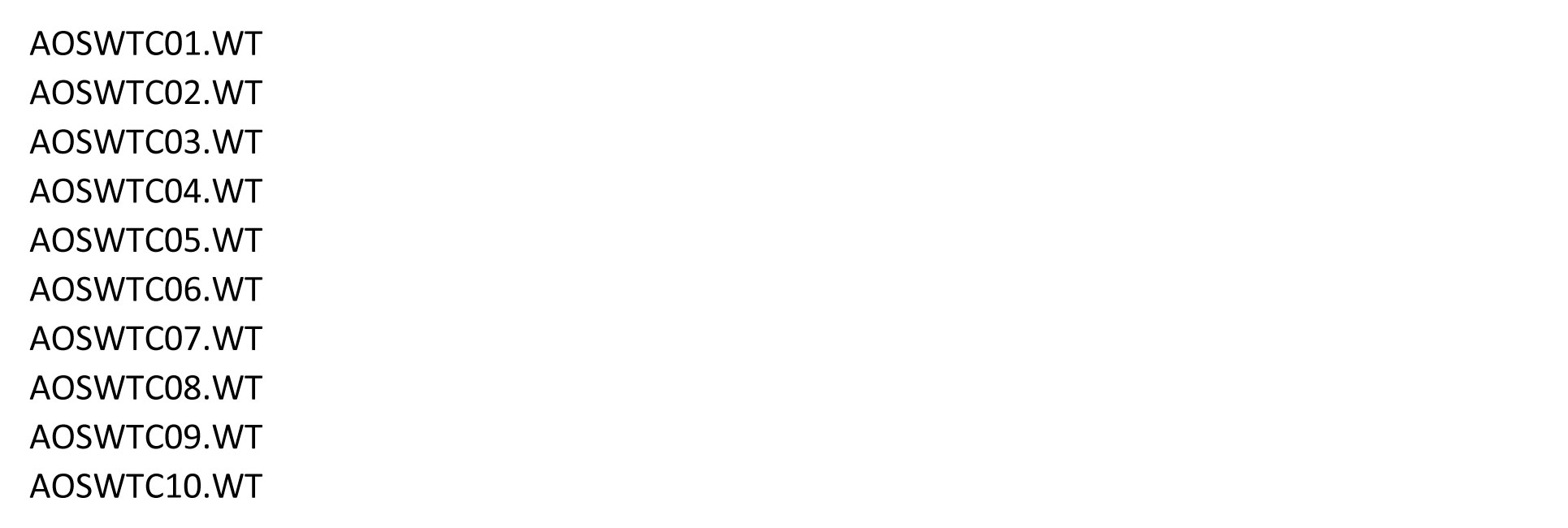
The AOS-Wavetables folder contains the following files:
50 single AOS-Wavetables:
10 multi AOS-Wavetables (33 frames):
Notice: To ensure proper functionality of the AOS Wavetables with the presets in the Infinite XT – Volume 1 collection, keep the original folder structure intact. Do not rename or reorder any files. Once the copying process is complete, no further adjustments are required.
How can I locate the AOS wavetables in Surge XT and verify that the installation was successful?
• Open Surge XT.
• Select Oscillator 1, 2, or 3.
• Click the oscillator type and choose Wavetable.
If the installation was successful, you will find a folder named AOS-Wavetables in the USER WAVETABLES section.
Figure 2: Wavetable selection menu in Surge XT
AOS-Wavetables are now activated and ready to use in all presets from the Infinite XT – Volume 1 collection.
How do I install the Infinite XT – Volume 1 (Surge XT) sound collection into the Surge XT VST synthesizer?
2.1 Make Sure You Have the Surge XT VST Synthesizer Installed
The collection is designed for the Surge XT VST synthesizer, version 1.3.4 (Windows/macOS/Linux, 64 bit).
You can find the official Surge XT download page here: https://surge-synthesizer.github.io/downloads/
2.2 Extract the downloaded ZIP file named “SRGINXT1 – Infinite XT – Volume 1“ to any location on your computer
The ZIP file contains:
• Read First - Basic Information (TXT)
• Folder: Infinite XT - Volume 1 (Surge XT)
This folder includes 7 subdirectories: Bass, FX, Keys, Pads, Plucks, Sequences and Textures.
• Folder: AOS-Wavetables
(50 single-cycle waveforms + 10 multi-frame wavetables / a total of 380 frames).
• Folder: AOS-Documentation (Infinite XT - Volume 1)
o Reference Guide (PDF)
o Sound Program List (PDF)
2.3 Open the Surge XT User Data Folder
Surge XT stores its user presets, wavetables, and other user specific data in a dedicated folder within your operating system. The exact location depends on the platform.
Windows: C:\Users\Your User Name\Documents\Surge XT\
macOS: /Users/Your User Name/Documents/Surge XT/
Linux: ~/Documents/Surge XT/
(This folder is created automatically when you save your first preset or change any user settings.)
What each part of the directory path means:
• C: – the name of the system drive
• Users – the directory where Windows/macOS/Linux stores all user profiles
• Your User Name – your specific user account name (e.g., John, Isabella, StudioPC)
• Documents – your personal Documents folder
• Surge XT – the application created folder where presets and other user data are stored
• Patches – the application created folder where user patches are saved
2.4 Copy the Presets into Surge XT
In the Surge XT user data folder, open the subdirectory named Patches.
Windows: C:\Users\Your User Name\Documents\Surge XT\Patches
macOS: /Users/Your User Name/Documents/Surge XT/Patches
Linux: ~/Documents/Surge XT/Patches
(This folder is created automatically the first time you save a preset or change any user settings.)
Copy the entire Infinite XT – Volume 1 (Surge XT) folder from the soundware package, into the subdirectory mentioned above.
Where can I find the Art of Sound presets in the Surge XT synthesizer?
• Open Surge XT.
• Click the preset name at the top of the window.
• In the top menu, navigate to the category USER PATCHES
• Locate the folder Infinite XT – Volume 1 (Surge XT).
• The presets are organized into the following categories: Bass, FX, Keys, Pads, Plucks, Sequences and Textures.
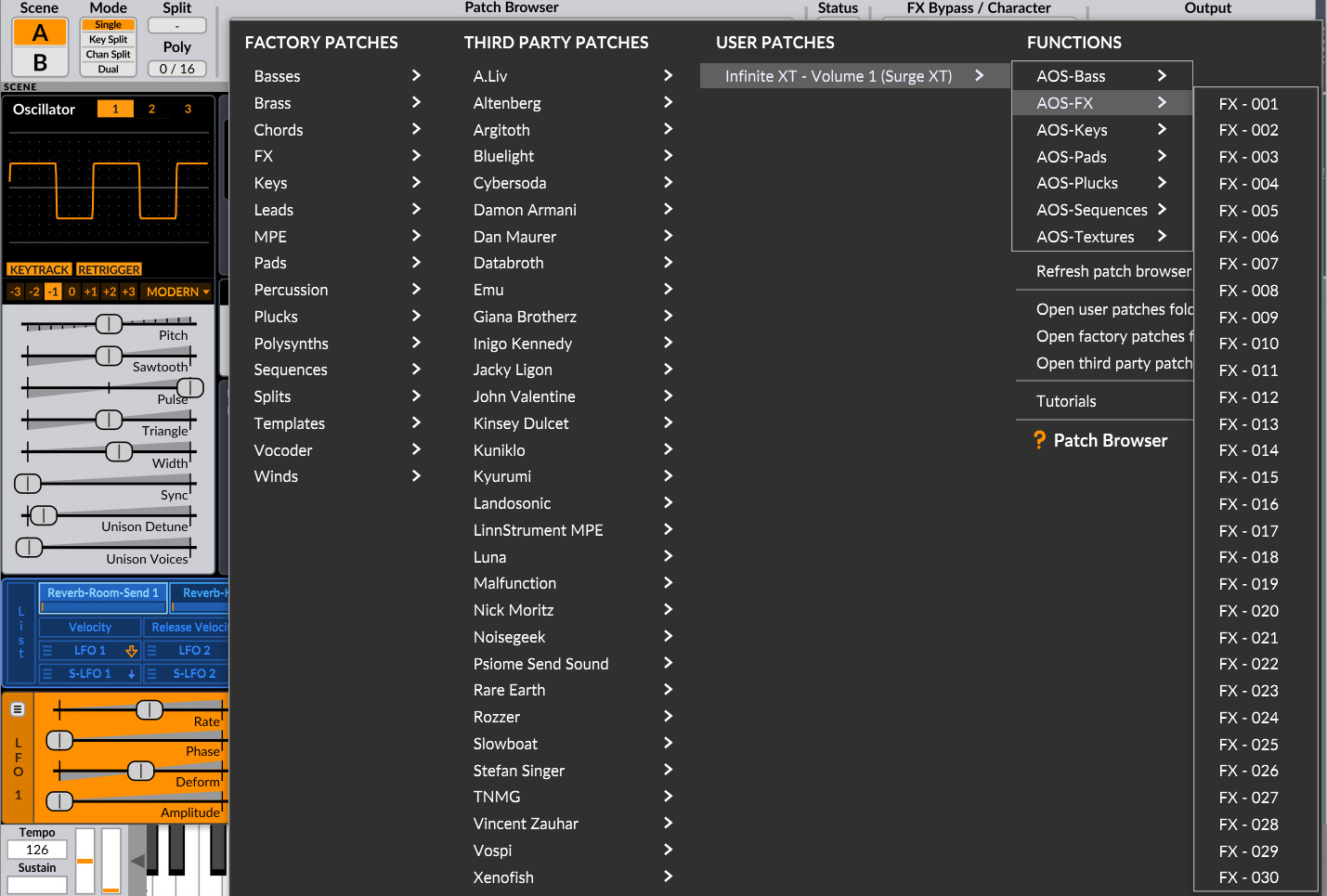
Figure 3: The preset selection menu in Surge XT
Select any sound category and choose the presets you need for your music production or instant creative inspiration.





Support
- Infinite XT - FAQ (Surge XT)
- Infinite XT - Info (Surge XT)
- K:Works - FAQ (Kurzweil K2xxx)
- K:Works - Info (Kurzweil K2xxx)
- PC3:Works - FAQ (Kurzweil PC3)
- PC3:Works - Info (Kurzweil PC3)
- PC3K:Works - FAQ (Kurzweil PC3K)
- PC3K:Works - Info (Kurzweil PC3K)
- PULSation - FAQ (Waldorf Pulse/Pulse +)
- PULSation - Info (Waldorf Pulse/Pulse +)
- VIR2ALL - FAQ (Access Virus B/C/TI/TI Snow/TI2/TDM)
- VIR2ALL - Info (Access Virus B/C/TI/TI Snow/TI2/TDM)


